Configuring IIS to accomplish MIME mapping
To accomplish MIME mapping, open IIS and follow the steps below;
-
On the left hand side, select either your web site or the entire server in the "Connections" menu. If you select the server, your MIME mapping will apply to every web site on the server. If you select a web site, it will only apply to a single web site.
-
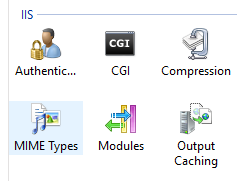
Next, select "MIME Types" from the IIS menu:
-
Once there, click "add..." from the right hand menu.
-
In the dialog box that opens specify
.webmanifestin the file name extension boxapplication/manifest+jsonin the MIME type box.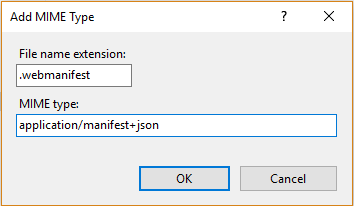
-
Click "OK".